Theme Preview: glass-tty
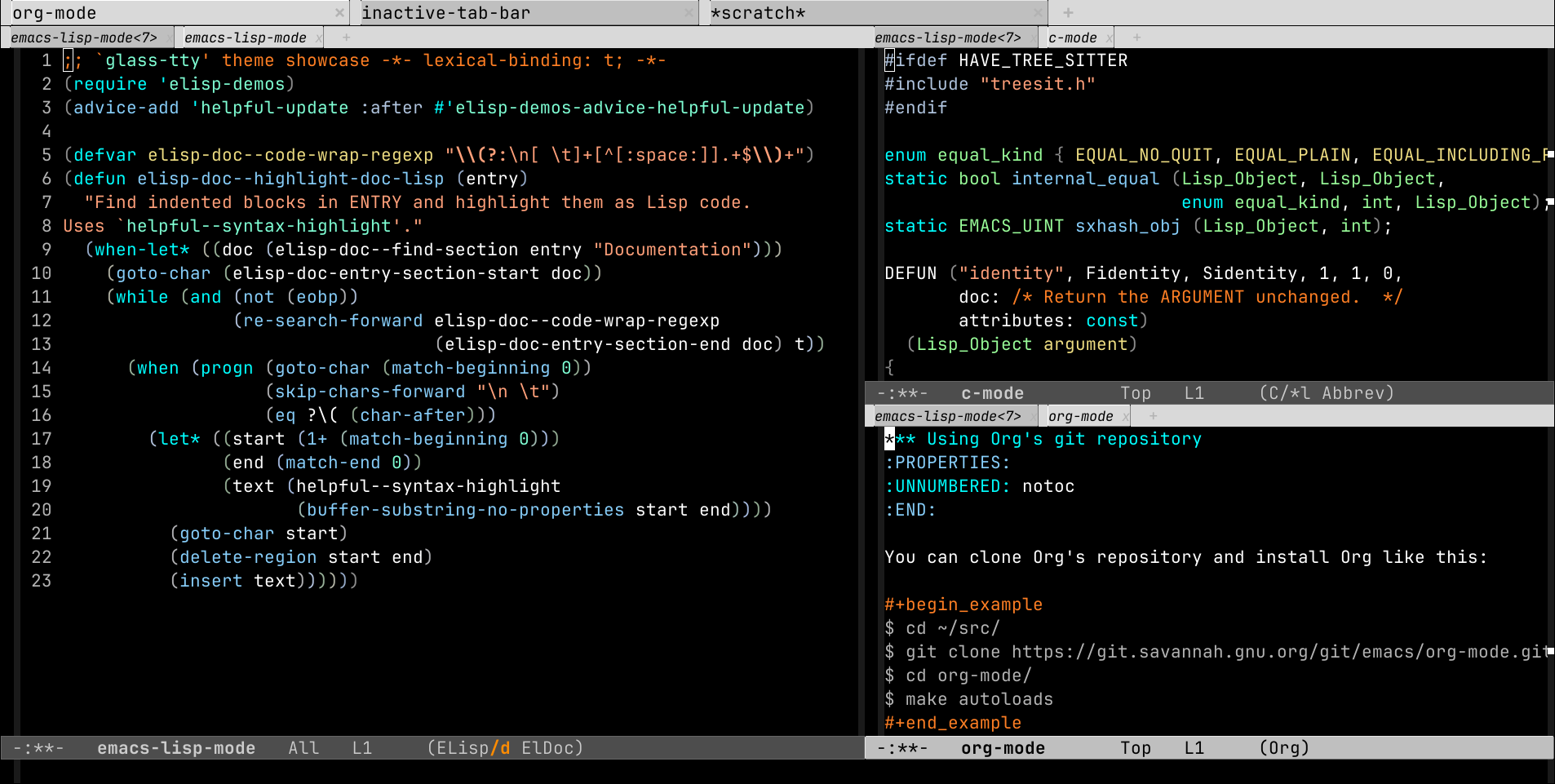
Package
| Package | glass-tty-theme - melpa |
|---|---|
| Source Repository | https://github.com/irtnog/glass-tty-theme |
| Summary | Reverse video-like theme for the Glass TTY VT220 font. |
| Version | 20240909.1259 |
| Website | https://github.com/irtnog/glass-tty-theme |
| Commit | 59126e888d9a237c6a0461e3712665d543f1320d |
| Author | Matthew X. Economou <xenophon+glass-tty-theme@irtnog.org> |
Reverse video-like theme for use with the Glass TTY VT220 font.Like the 'reverse' theme, this mimics the color theme applied
when starting Emacs in reverse video mode while adding support
for multiple frames. Additionally, 'glass-tty' addresses some
issues 'reverse' has with multiple frames while remaining
backwards compatible with the default theme for tty frames.
Because this theme is also designed around the Glass TTY VT220
font, it automatically scales the font correctly depending on the
windowing system. The end result is a color theme suitable for
use when Emacs runs as a service across multiple platforms.Before using this theme, dowload and install the font from
https://caglrc.cc/~svo/glasstty/. How to change Emacs' default
font depends on the windowing system:
On Windows, create a Registry key named
HKEY_CURRENT_USER\Software\GNU\Emacs\ containing a string value
'Emacs.Font' with the data
'--Glass TTY VT220------150------*'.On X11, add the following to ~/.Xresources:
'Emacs.Font: --Glass TTY VT220------150------*'On macOS, run the following Emacs Lisp expression:
'(add-to-list 'default-frame-alist
'(font . "--Glass TTY VT220------200------*"))'See also:
https://www.emacswiki.org/emacs/SetFonts
https://www.emacswiki.org/emacs/ChangeFontsPermanentlyOnWindowsReverse video-like theme for use with the Glass TTY VT220 font.
Like the 'reverse' theme, this mimics the color theme applied when
starting Emacs in reverse video mode while adding support for
multiple frames. Additionally, 'glass-tty' addresses some issues
'reverse' has with multiple frames while remaining backwards
compatible with the default theme for tty frames. Because this
theme is also designed around the Glass TTY VT220 font, it
automatically scales the font correctly depending on the windowing
system. The end result is a color theme suitable for use when
Emacs runs as a service across multiple platforms.Before using this theme, dowload and install the font from
https://caglrc.cc/~svo/glasstty/. How to change Emacs' default
font depends on the windowing system:
On Windows, create a Registry key named
HKEY_CURRENT_USER\Software\GNU\Emacs\ containing a string
value 'Emacs.Font' with the data '--Glass TTY
VT220------150------*'.On X11, add the following to ~/.Xresources: 'Emacs.Font: --Glass
TTY VT220------150------*'On macOS, run the following Emacs Lisp expression: '(add-to-list
'default-frame-alist '(font . "--Glass TTY
VT220------200------*"))'See also:
https://www.emacswiki.org/emacs/SetFonts
https://www.emacswiki.org/emacs/ChangeFontsPermanentlyOnWindows
More Previews
1 #ifdef HAVE_TREE_SITTER 2 #include "treesit.h" 3 #endif 4 5 enum equal_kind { EQUAL_NO_QUIT, EQUAL_PLAIN, EQUAL_INCLUDING_PROPERTIES }; 6 static bool internal_equal (Lisp_Object, Lisp_Object, 7 enum equal_kind, int, Lisp_Object); 8 static EMACS_UINT sxhash_obj (Lisp_Object, int); 9 10 DEFUN ("identity", Fidentity, Sidentity, 1, 1, 0, 11 doc: /* Return the ARGUMENT unchanged. */ 12 attributes: const) 13 (Lisp_Object argument) 14 { 15 return argument; 16 } -:**- c-mode All L17 (C/*l Abbrev) 1 ;; This buffer is for text that is not saved, and for Lisp evaluation. 2 -:**- emacs-lisp-mode<3> All L3 (ELisp/d ElDoc)
1 *** Using Org's git repository 2 :PROPERTIES: 3 :UNNUMBERED: notoc 4 :END: 5 6 You can clone Org's repository and install Org like this: 7 8 #+begin_example 9 $ cd ~/src/ 10 $ git clone https://git.savannah.gnu.org/git/emacs/org-mode.git 11 $ cd org-mode/ 12 $ make autoloads 13 #+end_example 14 15 Note that in this case, =make autoloads= is mandatory: it defines 16 Org's version in =org-version.el= and Org's autoloads in 17 =org-loaddefs.el=. 18 19 Make sure you set the load path correctly in your Emacs init file: 20 21 #+begin_src emacs-lisp 22 (add-to-list 'load-path "~/src/org-mode/lisp") 23 #+end_src -:**- org-mode All L24 (Org) 1 ;; This buffer is for text that is not saved, and for Lisp evaluation. 2 -:**- emacs-lisp-mode<4> All L3 (ELisp/d ElDoc)
1 ;; `glass-tty' theme showcase -*- lexical-binding: t; -*- 2 (require 'elisp-demos) 3 (advice-add 'helpful-update :after #'elisp-demos-advice-helpful-update) 4 5 (defvar elisp-doc--code-wrap-regexp "\\(?:\n[ \t]+[^[:space:]].+$\\)+") 6 (defun elisp-doc--highlight-doc-lisp (entry) 7 "Find indented blocks in ENTRY and highlight them as Lisp code. 8 Uses `helpful--syntax-highlight'." 9 (when-let* ((doc (elisp-doc--find-section entry "Documentation"))) 10 (goto-char (elisp-doc-entry-section-start doc)) 11 (while (and (not (eobp)) 12 (re-search-forward elisp-doc--code-wrap-regexp 13 (elisp-doc-entry-section-end doc) t)) 14 (when (progn (goto-char (match-beginning 0)) 15 (skip-chars-forward "\n \t") 16 (eq ?\( (char-after))) 17 (let* ((start (1+ (match-beginning 0))) 18 (end (match-end 0)) 19 (text (helpful--syntax-highlight 20 (buffer-substring-no-properties start end)))) 21 (goto-char start) 22 (delete-region start end) 23 (insert text)))))) -:**- emacs-lisp-mode All L24 (ELisp/d ElDoc) 1 ;; This buffer is for text that is not saved, and for Lisp evaluation. 2 -:**- emacs-lisp-mode<2> All L3 (ELisp/d ElDoc)
1 import 'https://cdn.jsdelivr.net/npm/minisearch@7.2.0/dist/umd/index.min.js'; 2 3 (() => { 4 const tableElement = document.querySelector('.table') || window.dataTable; 5 if (!tableElement) { 6 return; 7 } 8 const where = document.querySelector('button') || tableElement; 9 10 /** 11 * @type {{symbol: string, file: string}[]} 12 */ 13 const rows = [...tableElement.querySelectorAll('tr')]; 14 const data = rows.map((tr, i) => ({ 15 id: i, 16 symbol: tr.childNodes[0].textContent, 17 file: tr.childNodes[1].textContent, 18 })); 19 const container = document.createElement('div'); 20 container.classList.add('table', 'show'); 21 container.innerHTML = ` 22 <table><thead><tr> 23 <th>Symbol<br><input id="symbol"></th> 24 <th>File<br><input id="file"></th> 25 </tr></thead><tbody id="results"></tbody></table> 26 <div class="paging"><button id="prev">Prev</button> 27 <span id="page">1-${paging.page} of ${paging.page}</span> 28 <button id="next">Next</button></div> 29 `; 30 where.parentNode.replaceChild(container, where); 31 const style = document.createElement('style'); 32 // ... 33 })(); -:**- js-mode All L34 (JavaScript) 1 ;; This buffer is for text that is not saved, and for Lisp evaluation. 2 -:**- emacs-lisp-mode<6> All L3 (ELisp/d ElDoc)
1 <!DOCTYPE html> 2 <html> 3 <head> 4 <meta charset="UTF-8"> 5 <meta http-equiv="refresh" content="0; url=https://doc.emacsen.de/elisp/nil-and-t.html"> 6 <link rel="icon" href="/favicon.ico" sizes="48x48"> 7 <link rel="icon" href="/icon.svg" type="image/svg+xml"> 8 <link rel="apple-touch-icon" href="/apple-touch-icon.png"> 9 <script type="text/javascript"> 10 window.location.pathname='/elisp/nil-and-t.html' 11 </script> 12 <title>Emacs Lisp Boolean Values</title> 13 </head> 14 <body> 15 Visit <a href="/elisp/nil-and-t.html">nil and t (GNU Emacs Lisp Reference Manual)</a> 16 for <code>nil</code> and <code>t</code> documentation. 17 </body> 18 </html> -:**- html-mode All L19 (HTML) 1 ;; This buffer is for text that is not saved, and for Lisp evaluation. 2 -:**- emacs-lisp-mode<5> All L3 (ELisp/d ElDoc)
1 :root { 2 --background:#f8f8ff; 3 --text-muted:#70777f; 4 --links:#0076d1; 5 --border:#dbdbdb; 6 } 7 @media (prefers-color-scheme:dark) { 8 :root { 9 --background:#161f27; 10 --text-muted:#a9b1ba; 11 --links:#41adff; 12 --border:#526980; 13 } 14 } 15 html { 16 margin: 0 1em; 17 } 18 body { 19 line-height: 1.4; 20 max-width: 800px; 21 margin: 20px auto; 22 word-wrap: break-word; 23 text-rendering: optimizeLegibility; 24 } -:**- css-mode All L25 (CSS) 1 ;; This buffer is for text that is not saved, and for Lisp evaluation. 2 -:**- emacs-lisp-mode<7> All L3 (ELisp/d ElDoc)