Theme Preview: org-beautify
Package
| Package | org-beautify-theme - melpa |
|---|---|
| Source Repository | https://github.com/jonnay/org-beautify-theme |
| Keywords | faces org theme |
| Summary | A sub-theme to make org-mode more beautiful. |
| Version | 20250730.2044 |
| Website | https://github.com/jonnay/org-beautify-theme |
| Commit | 5301f8cfab127f4219aad83e52787898f0710d4f |
| Author | Jonathan Arkell <jonnay@jonnay.net> |
Sub-theme to beautify org mode[[./screenshot.png]]
Making Org-mode Beautiful
** This theme is dedicated to my wife Shell
Who—in her beauty, her love, and her love for beauty—has shown me
that form can enhance function.Mission
- Make org mode headlines easy to read. In any theme.
- Make it look more like a published book and/or desktop app, less
like angry fruit salad.- Make it awesome to live in an org buffer.
Usage
Load this theme over top your existing theme, and you should be
golden. If you find any incompatibilities, let me know with what
theme and I will try and fix it.When loading a whole new theme overtop, org-beautify-theme will
still be active with the old theme. Just unload org-beautify-theme
and then reload it, and everything will be fine again.If you still get really ugly headlines, customize the
~org-beautify-theme-use-box-hack~ variable and set it to nil (false).Changelog
- v0.5 :: [2025-07-30]
- ACTUALLY fix checkboxes
- Fix lint errors
- v0.4 :: [2017-09-08]
- Add org-beautify-theme-use-box-hack to allow the user to
fix ugly boxes.- v0.3.2 :: [2017-08-29]
- Update License
- v0.3.1 :: [2016-10-19]
- Fix load path issues (Thanks PierreTechoueyres!)
- reverse chronological changelog, because ah-doy!
- v0.2 :: [2016-08-08]
- Better repository Location
- Fix so that you can load the theme properly.
- v0.1.2 :: [2014-01-06]
- Add Verdana font to fall back on
- v0.1.1 :: [2014-01-06]
- Fix checkboxes
- v0.1 :: First Release
- Make the colors suck a lot less, and the buffers look a lot nicer.
More Previews
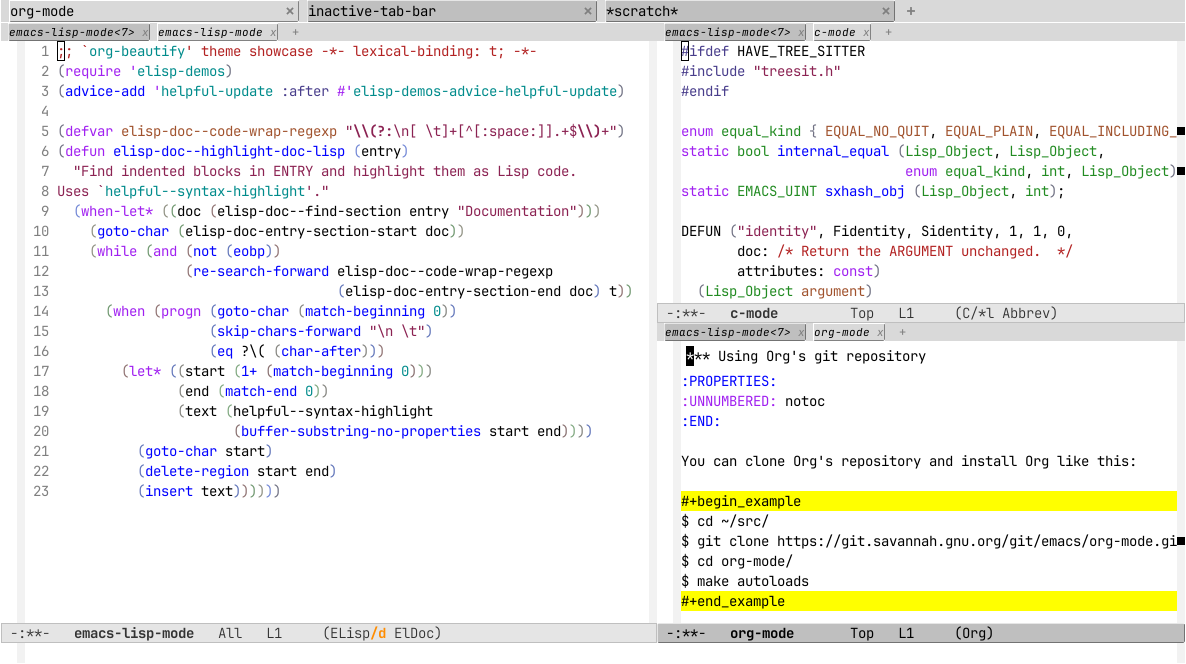
1 #ifdef HAVE_TREE_SITTER 2 #include "treesit.h" 3 #endif 4 5 enum equal_kind { EQUAL_NO_QUIT, EQUAL_PLAIN, EQUAL_INCLUDING_PROPERTIES }; 6 static bool internal_equal (Lisp_Object, Lisp_Object, 7 enum equal_kind, int, Lisp_Object); 8 static EMACS_UINT sxhash_obj (Lisp_Object, int); 9 10 DEFUN ("identity", Fidentity, Sidentity, 1, 1, 0, 11 doc: /* Return the ARGUMENT unchanged. */ 12 attributes: const) 13 (Lisp_Object argument) 14 { 15 return argument; 16 } -:**- c-mode All L17 (C/*l Abbrev) 1 ;; This buffer is for text that is not saved, and for Lisp evaluation. 2 -:**- emacs-lisp-mode<3> All L3 (ELisp/d ElDoc)
1 *** Using Org's git repository 2 :PROPERTIES: 3 :UNNUMBERED: notoc 4 :END: 5 6 You can clone Org's repository and install Org like this: 7 8 #+begin_example 9 $ cd ~/src/ 10 $ git clone https://git.savannah.gnu.org/git/emacs/org-mode.git 11 $ cd org-mode/ 12 $ make autoloads 13 #+end_example 14 15 Note that in this case, =make autoloads= is mandatory: it defines 16 Org's version in =org-version.el= and Org's autoloads in 17 =org-loaddefs.el=. 18 19 Make sure you set the load path correctly in your Emacs init file: 20 21 #+begin_src emacs-lisp 22 (add-to-list 'load-path "~/src/org-mode/lisp") 23 #+end_src -:**- org-mode All L24 (Org) 1 ;; This buffer is for text that is not saved, and for Lisp evaluation. 2 -:**- emacs-lisp-mode<4> All L3 (ELisp/d ElDoc)
1 ;; `org-beautify' theme showcase -*- lexical-binding: t; -*- 2 (require 'elisp-demos) 3 (advice-add 'helpful-update :after #'elisp-demos-advice-helpful-update) 4 5 (defvar elisp-doc--code-wrap-regexp "\\(?:\n[ \t]+[^[:space:]].+$\\)+") 6 (defun elisp-doc--highlight-doc-lisp (entry) 7 "Find indented blocks in ENTRY and highlight them as Lisp code. 8 Uses `helpful--syntax-highlight'." 9 (when-let* ((doc (elisp-doc--find-section entry "Documentation"))) 10 (goto-char (elisp-doc-entry-section-start doc)) 11 (while (and (not (eobp)) 12 (re-search-forward elisp-doc--code-wrap-regexp 13 (elisp-doc-entry-section-end doc) t)) 14 (when (progn (goto-char (match-beginning 0)) 15 (skip-chars-forward "\n \t") 16 (eq ?\( (char-after))) 17 (let* ((start (1+ (match-beginning 0))) 18 (end (match-end 0)) 19 (text (helpful--syntax-highlight 20 (buffer-substring-no-properties start end)))) 21 (goto-char start) 22 (delete-region start end) 23 (insert text)))))) -:**- emacs-lisp-mode All L24 (ELisp/d ElDoc) 1 ;; This buffer is for text that is not saved, and for Lisp evaluation. 2 -:**- emacs-lisp-mode<2> All L3 (ELisp/d ElDoc)
1 import 'https://cdn.jsdelivr.net/npm/minisearch@7.2.0/dist/umd/index.min.js'; 2 3 (() => { 4 const tableElement = document.querySelector('.table') || window.dataTable; 5 if (!tableElement) { 6 return; 7 } 8 const where = document.querySelector('button') || tableElement; 9 10 /** 11 * @type {{symbol: string, file: string}[]} 12 */ 13 const rows = [...tableElement.querySelectorAll('tr')]; 14 const data = rows.map((tr, i) => ({ 15 id: i, 16 symbol: tr.childNodes[0].textContent, 17 file: tr.childNodes[1].textContent, 18 })); 19 const container = document.createElement('div'); 20 container.classList.add('table', 'show'); 21 container.innerHTML = ` 22 <table><thead><tr> 23 <th>Symbol<br><input id="symbol"></th> 24 <th>File<br><input id="file"></th> 25 </tr></thead><tbody id="results"></tbody></table> 26 <div class="paging"><button id="prev">Prev</button> 27 <span id="page">1-${paging.page} of ${paging.page}</span> 28 <button id="next">Next</button></div> 29 `; 30 where.parentNode.replaceChild(container, where); 31 const style = document.createElement('style'); 32 // ... 33 })(); -:**- js-mode All L34 (JavaScript) 1 ;; This buffer is for text that is not saved, and for Lisp evaluation. 2 -:**- emacs-lisp-mode<6> All L3 (ELisp/d ElDoc)
1 <!DOCTYPE html> 2 <html> 3 <head> 4 <meta charset="UTF-8"> 5 <meta http-equiv="refresh" content="0; url=https://doc.emacsen.de/elisp/nil-and-t.html"> 6 <link rel="icon" href="/favicon.ico" sizes="48x48"> 7 <link rel="icon" href="/icon.svg" type="image/svg+xml"> 8 <link rel="apple-touch-icon" href="/apple-touch-icon.png"> 9 <script type="text/javascript"> 10 window.location.pathname='/elisp/nil-and-t.html' 11 </script> 12 <title>Emacs Lisp Boolean Values</title> 13 </head> 14 <body> 15 Visit <a href="/elisp/nil-and-t.html">nil and t (GNU Emacs Lisp Reference Manual)</a> 16 for <code>nil</code> and <code>t</code> documentation. 17 </body> 18 </html> -:**- html-mode All L19 (HTML) 1 ;; This buffer is for text that is not saved, and for Lisp evaluation. 2 -:**- emacs-lisp-mode<5> All L3 (ELisp/d ElDoc)
1 :root { 2 --background:#f8f8ff; 3 --text-muted:#70777f; 4 --links:#0076d1; 5 --border:#dbdbdb; 6 } 7 @media (prefers-color-scheme:dark) { 8 :root { 9 --background:#161f27; 10 --text-muted:#a9b1ba; 11 --links:#41adff; 12 --border:#526980; 13 } 14 } 15 html { 16 margin: 0 1em; 17 } 18 body { 19 line-height: 1.4; 20 max-width: 800px; 21 margin: 20px auto; 22 word-wrap: break-word; 23 text-rendering: optimizeLegibility; 24 } -:**- css-mode All L25 (CSS) 1 ;; This buffer is for text that is not saved, and for Lisp evaluation. 2 -:**- emacs-lisp-mode<7> All L3 (ELisp/d ElDoc)