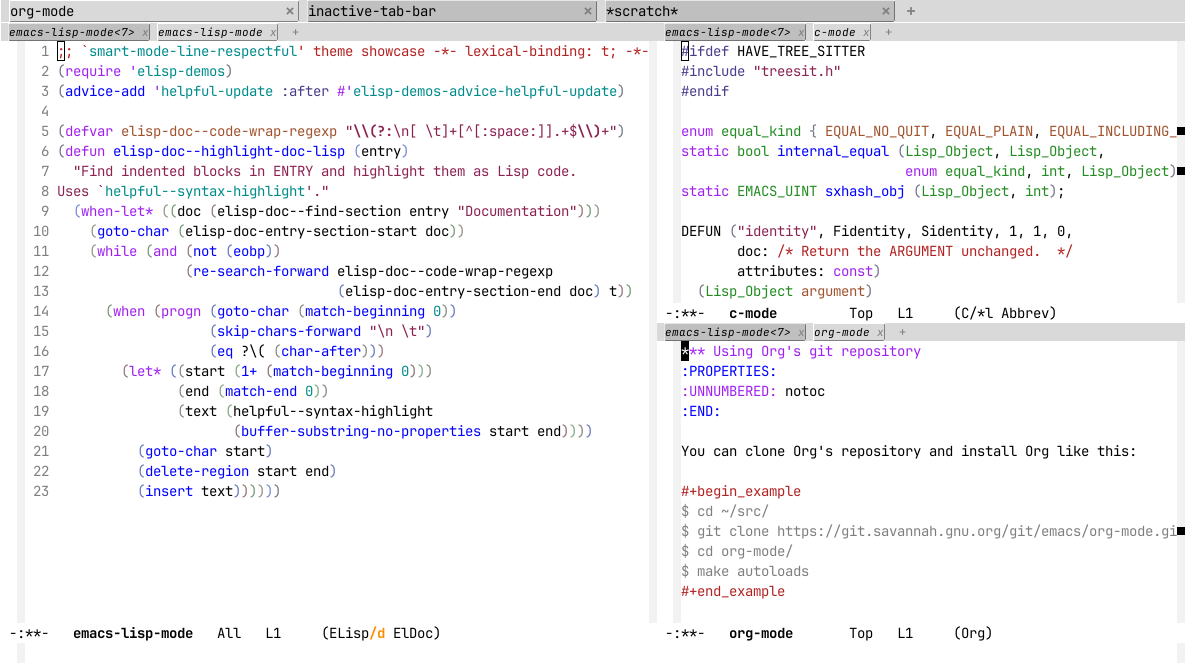
Theme Preview: smart-mode-line-respectful
Package
| Package | smart-mode-line - melpa |
|---|---|
| Source Repository | https://github.com/Malabarba/smart-mode-line |
| Keywords | mode-line faces themes |
| Summary | A color coded smart mode-line. |
| Version | 20240924.2322 |
| Website | https://github.com/Malabarba/smart-mode-line |
| Commit | bbed708eb8393697e01ab2474dfb54d7c5ea7905 |
| Author | Artur Malabarba <emacs@endlessparentheses.com> |
Respectful theme for smart-mode-line.
Tries to respect the colors chosen by your global theme.
Results may vary.Smart Mode Line is a sexy mode-line for Emacs. It aims to be easy to
read from small to large monitors by using colors, a prefix feature, and
smart truncation.New in v2.5
===========
- Emacs 24.4 compatible.
- Integration with Projectile!
- Display
current-directoryin Shell and eshell.- New value for
sml/theme:automatic(highly recommended).sml/apply-themeis interactive and has completion.- Smart-mode-line themes are now regular themes.
Installation
===
smart-mode-line is available on Melpa, and that's the recommended
way of installing it. If you do that, you can simply activate it with:(sml/setup)To set the color theme, do one of the following BEFORE
sml/setup:(setq sml/theme 'dark)<br> (setq sml/theme 'light)<br> (setq sml/theme 'respectful)Features
===
Its main features include:
Color coded:
Highlights the most important information for you
(buffer name, modified state, line number). Don't
like the colors? See item 5.!Fixed width (if you want):
Lets you set a maxium width for the path name and mode names, and
truncates them intelligently (truncates the directory, not the
buffer name). Also let's you right indent strings in the
mode-line (seesml/mode-width).Directory as Prefixes:
Prefix feature saves a LOT of space. e.g. "~/.emacs.d/"
is translated to ":ED:" in the path (open a file inside
this folder to see it in action). Long path names you
are commonly working on are displayed as short
abbreviations. Set your own prefixes to make best use
of it (by configuringsml/replacer-regexp-list). Mousing
over the abbreviated path will show you the full
path. See below for examples.Hide or Highlight minor-modes:
The rich-minority
package saves even more space. Select which minor modes you don't
want to see listed by adding them to the variablerm-excluded-modes, or even highlight the modes that are more
important with the variablerm-text-properties. This will filter
out the modes you don't care about and unclutter the modes list
(mousing over the modes list still shows the full list).Hide minor-modes:
Hidden-modes feature saves even more space. Select
which minor modes you don't want to see listed by
customizing therm-blacklistvariable. This will
filter out the modes you don't care about and unclutter
the modes list (mousing over the modes list still shows
the full list)....
More Previews
1 #ifdef HAVE_TREE_SITTER 2 #include "treesit.h" 3 #endif 4 5 enum equal_kind { EQUAL_NO_QUIT, EQUAL_PLAIN, EQUAL_INCLUDING_PROPERTIES }; 6 static bool internal_equal (Lisp_Object, Lisp_Object, 7 enum equal_kind, int, Lisp_Object); 8 static EMACS_UINT sxhash_obj (Lisp_Object, int); 9 10 DEFUN ("identity", Fidentity, Sidentity, 1, 1, 0, 11 doc: /* Return the ARGUMENT unchanged. */ 12 attributes: const) 13 (Lisp_Object argument) 14 { 15 return argument; 16 } -:**- c-mode All L17 (C/*l Abbrev) 1 ;; This buffer is for text that is not saved, and for Lisp evaluation. 2 -:**- emacs-lisp-mode<3> All L3 (ELisp/d ElDoc)
1 *** Using Org's git repository 2 :PROPERTIES: 3 :UNNUMBERED: notoc 4 :END: 5 6 You can clone Org's repository and install Org like this: 7 8 #+begin_example 9 $ cd ~/src/ 10 $ git clone https://git.savannah.gnu.org/git/emacs/org-mode.git 11 $ cd org-mode/ 12 $ make autoloads 13 #+end_example 14 15 Note that in this case, =make autoloads= is mandatory: it defines 16 Org's version in =org-version.el= and Org's autoloads in 17 =org-loaddefs.el=. 18 19 Make sure you set the load path correctly in your Emacs init file: 20 21 #+begin_src emacs-lisp 22 (add-to-list 'load-path "~/src/org-mode/lisp") 23 #+end_src -:**- org-mode All L24 (Org) 1 ;; This buffer is for text that is not saved, and for Lisp evaluation. 2 -:**- emacs-lisp-mode<4> All L3 (ELisp/d ElDoc)
1 ;; `smart-mode-line-respectful' theme showcase -*- lexical-binding: t; -*- 2 (require 'elisp-demos) 3 (advice-add 'helpful-update :after #'elisp-demos-advice-helpful-update) 4 5 (defvar elisp-doc--code-wrap-regexp "\\(?:\n[ \t]+[^[:space:]].+$\\)+") 6 (defun elisp-doc--highlight-doc-lisp (entry) 7 "Find indented blocks in ENTRY and highlight them as Lisp code. 8 Uses `helpful--syntax-highlight'." 9 (when-let* ((doc (elisp-doc--find-section entry "Documentation"))) 10 (goto-char (elisp-doc-entry-section-start doc)) 11 (while (and (not (eobp)) 12 (re-search-forward elisp-doc--code-wrap-regexp 13 (elisp-doc-entry-section-end doc) t)) 14 (when (progn (goto-char (match-beginning 0)) 15 (skip-chars-forward "\n \t") 16 (eq ?\( (char-after))) 17 (let* ((start (1+ (match-beginning 0))) 18 (end (match-end 0)) 19 (text (helpful--syntax-highlight 20 (buffer-substring-no-properties start end)))) 21 (goto-char start) 22 (delete-region start end) 23 (insert text)))))) -:**- emacs-lisp-mode All L24 (ELisp/d ElDoc) 1 ;; This buffer is for text that is not saved, and for Lisp evaluation. 2 -:**- emacs-lisp-mode<2> All L3 (ELisp/d ElDoc)
1 import 'https://cdn.jsdelivr.net/npm/minisearch@7.2.0/dist/umd/index.min.js'; 2 3 (() => { 4 const tableElement = document.querySelector('.table') || window.dataTable; 5 if (!tableElement) { 6 return; 7 } 8 const where = document.querySelector('button') || tableElement; 9 10 /** 11 * @type {{symbol: string, file: string}[]} 12 */ 13 const rows = [...tableElement.querySelectorAll('tr')]; 14 const data = rows.map((tr, i) => ({ 15 id: i, 16 symbol: tr.childNodes[0].textContent, 17 file: tr.childNodes[1].textContent, 18 })); 19 const container = document.createElement('div'); 20 container.classList.add('table', 'show'); 21 container.innerHTML = ` 22 <table><thead><tr> 23 <th>Symbol<br><input id="symbol"></th> 24 <th>File<br><input id="file"></th> 25 </tr></thead><tbody id="results"></tbody></table> 26 <div class="paging"><button id="prev">Prev</button> 27 <span id="page">1-${paging.page} of ${paging.page}</span> 28 <button id="next">Next</button></div> 29 `; 30 where.parentNode.replaceChild(container, where); 31 const style = document.createElement('style'); 32 // ... 33 })(); -:**- js-mode All L34 (JavaScript) 1 ;; This buffer is for text that is not saved, and for Lisp evaluation. 2 -:**- emacs-lisp-mode<6> All L3 (ELisp/d ElDoc)
1 <!DOCTYPE html> 2 <html> 3 <head> 4 <meta charset="UTF-8"> 5 <meta http-equiv="refresh" content="0; url=https://doc.emacsen.de/elisp/nil-and-t.html"> 6 <link rel="icon" href="/favicon.ico" sizes="48x48"> 7 <link rel="icon" href="/icon.svg" type="image/svg+xml"> 8 <link rel="apple-touch-icon" href="/apple-touch-icon.png"> 9 <script type="text/javascript"> 10 window.location.pathname='/elisp/nil-and-t.html' 11 </script> 12 <title>Emacs Lisp Boolean Values</title> 13 </head> 14 <body> 15 Visit <a href="/elisp/nil-and-t.html">nil and t (GNU Emacs Lisp Reference Manual)</a> 16 for <code>nil</code> and <code>t</code> documentation. 17 </body> 18 </html> -:**- html-mode All L19 (HTML) 1 ;; This buffer is for text that is not saved, and for Lisp evaluation. 2 -:**- emacs-lisp-mode<5> All L3 (ELisp/d ElDoc)
1 :root { 2 --background:#f8f8ff; 3 --text-muted:#70777f; 4 --links:#0076d1; 5 --border:#dbdbdb; 6 } 7 @media (prefers-color-scheme:dark) { 8 :root { 9 --background:#161f27; 10 --text-muted:#a9b1ba; 11 --links:#41adff; 12 --border:#526980; 13 } 14 } 15 html { 16 margin: 0 1em; 17 } 18 body { 19 line-height: 1.4; 20 max-width: 800px; 21 margin: 20px auto; 22 word-wrap: break-word; 23 text-rendering: optimizeLegibility; 24 } -:**- css-mode All L25 (CSS) 1 ;; This buffer is for text that is not saved, and for Lisp evaluation. 2 -:**- emacs-lisp-mode<7> All L3 (ELisp/d ElDoc)