
Theme Preview: ef-bio
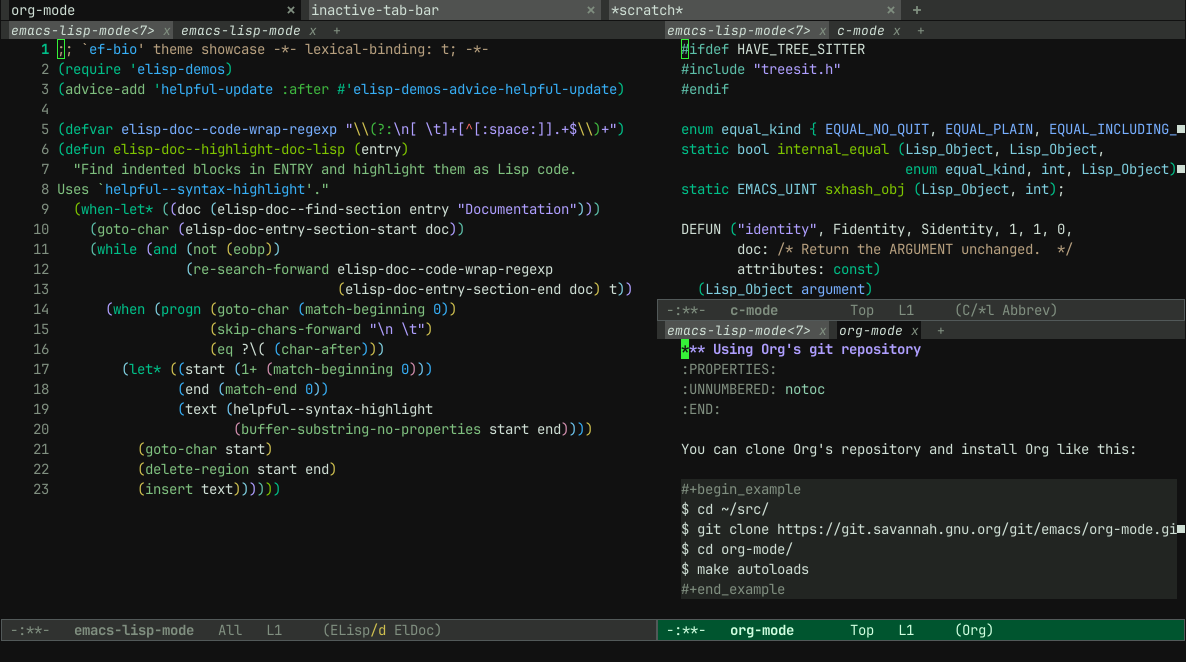
Package
| Package | ef-themes (gnu) |
|---|---|
| Source Repository | https://github.com/protesilaos/ef-themes |
| Keywords | faces theme accessibility |
| Summary | Colorful and legible themes |
| Version | 2.2.1 |
| Website | https://github.com/protesilaos/ef-themes |
| Commit | e1f617607a5f0692b398365dcd8412ba1e98ccb3 |
| Maintainer | Protesilaos <info@protesilaos.com> |
| Author | Protesilaos <info@protesilaos.com> |
Legible dark green-black theme with green, teal, blue, purple colors.# Ef (εὖ) themes for GNU Emacs
IMAGES HERE: < https://protesilaos.com/emacs/ef-themes-pictures >.
The
ef-themesare a collection of light and dark themes for GNU Emacs
whose goal is to provide colorful ("pretty") yet legible options for
users who want something with a bit more flair than themodus-themes
(also designed by me).Starting with version
2.0.0, theef-themesare built on top of themodus-themes. This means that all customisation options of the Modus
themes apply to the Ef themes. Same for all Modus commands that load a
theme. Enableef-themes-take-over-modus-themes-modeto set up this
arrangement (or enablemodus-themes-include-derivatives-modeinstead
to blend Ef and Modus into one collection).
- Package name (GNU ELPA):
ef-themes- Official manual: < https://protesilaos.com/emacs/ef-themes >
- Change log: < https://protesilaos.com/emacs/ef-themes-changelog >
- Sample pictures: < https://protesilaos.com/emacs/ef-themes-pictures >
- Git repositories:
- GitHub: < https://github.com/protesilaos/ef-themes >
- GitLab: < https://gitlab.com/protesilaos/ef-themes >
- Backronym: Eclectic Fashion in Themes Hides Exaggerated Markings, Embellishments, and Sparkles.
elisp(use-package ef-themes<br> :ensure t<br> :init<br> ;; This makes the Modus commands listed below consider only the Ef<br> ;; themes. For an alternative that includes Modus and all<br> ;; derivative themes (like Ef), enable the<br> ;; `modus-themes-include-derivatives-mode` instead. The manual of<br> ;; the Ef themes has a section that explains all the possibilities:<br> ;;<br> ;; - Evaluate `(info "(ef-themes) Working with other Modus themes or taking over Modus")`<br> ;; - Visit < https://protesilaos.com/emacs/ef-themes#h:6585235a-5219-4f78-9dd5-6a64d87d1b6e ><br> (ef-themes-take-over-modus-themes-mode 1)<br> :bind<br> (("< f5 >" . modus-themes-rotate)<br> ("C-< f5 >" . modus-themes-select)<br> ("M-< f5 >" . modus-themes-load-random))<br> :config<br> ;; All customisations here.<br> (setq modus-themes-mixed-fonts t)<br> (setq modus-themes-italic-constructs t) ;; Finally, load your theme of choice (or a random one with<br> ;; `modus-themes-load-random`, `modus-themes-load-random-dark`, ;; `modus-themes-load-random-light`).<br> (modus-themes-load-theme 'ef-summer))<br>
News
               ━━━━━━━━━━━━━━━━━━━━━━━━━━━━━<br>
                CHANGE LOG OF THE EF THEMES<br>
               ━━━━━━━━━━━━━━━━━━━━━━━━━━━━━
This document contains the release notes for each tagged commit on the
project's main git repository:
< https://github.com/protesilaos/ef-themes >....
More Previews
1 #ifdef HAVE_TREE_SITTER 2 #include "treesit.h" 3 #endif 4 5 enum equal_kind { EQUAL_NO_QUIT, EQUAL_PLAIN, EQUAL_INCLUDING_PROPERTIES }; 6 static bool internal_equal (Lisp_Object, Lisp_Object, 7 enum equal_kind, int, Lisp_Object); 8 static EMACS_UINT sxhash_obj (Lisp_Object, int); 9 10 DEFUN ("identity", Fidentity, Sidentity, 1, 1, 0, 11 doc: /* Return the ARGUMENT unchanged. */ 12 attributes: const) 13 (Lisp_Object argument) 14 { 15 return argument; 16 } -:**- c-mode All L17 (C/*l Abbrev) 1 ;; This buffer is for text that is not saved, and for Lisp evaluation. 2 -:**- emacs-lisp-mode<3> All L3 (Elisp/d ElDoc)
1 *** Using Org's git repository 2 :PROPERTIES: 3 :UNNUMBERED: notoc 4 :END: 5 6 You can clone Org's repository and install Org like this: 7 8 #+begin_example 9 $ cd ~/src/ 10 $ git clone https://git.savannah.gnu.org/git/emacs/org-mode.git 11 $ cd org-mode/ 12 $ make autoloads 13 #+end_example 14 15 Note that in this case, =make autoloads= is mandatory: it defines 16 Org's version in =org-version.el= and Org's autoloads in 17 =org-loaddefs.el=. 18 19 Make sure you set the load path correctly in your Emacs init file: 20 21 #+begin_src emacs-lisp 22 (add-to-list 'load-path "~/src/org-mode/lisp") 23 #+end_src -:**- org-mode All L24 (Org) 1 ;; This buffer is for text that is not saved, and for Lisp evaluation. 2 -:**- emacs-lisp-mode<4> All L3 (Elisp/d ElDoc)
1 ;; `ef-bio' theme showcase -*- lexical-binding: t; -*- 2 (require 'elisp-demos) 3 (advice-add 'helpful-update :after #'elisp-demos-advice-helpful-update) 4 5 (defvar elisp-doc--code-wrap-regexp "\\(?:\n[ \t]+[^[:space:]].+$\\)+") 6 (defun elisp-doc--highlight-doc-lisp (entry) 7 "Find indented blocks in ENTRY and highlight them as Lisp code. 8 Uses `helpful--syntax-highlight'." 9 (when-let* ((doc (elisp-doc--find-section entry "Documentation"))) 10 (goto-char (elisp-doc-entry-section-start doc)) 11 (while (and (not (eobp)) 12 (re-search-forward elisp-doc--code-wrap-regexp 13 (elisp-doc-entry-section-end doc) t)) 14 (when (progn (goto-char (match-beginning 0)) 15 (skip-chars-forward "\n \t") 16 (eq ?\( (char-after))) 17 (let* ((start (1+ (match-beginning 0))) 18 (end (match-end 0)) 19 (text (helpful--syntax-highlight 20 (buffer-substring-no-properties start end)))) 21 (goto-char start) 22 (delete-region start end) 23 (insert text)))))) -:**- emacs-lisp-mode All L24 (Elisp/d ElDoc) 1 ;; This buffer is for text that is not saved, and for Lisp evaluation. 2 -:**- emacs-lisp-mode<2> All L3 (Elisp/d ElDoc)
1 import 'https://cdn.jsdelivr.net/npm/minisearch@7.2.0/dist/umd/index.min.js'; 2 3 (() => { 4 const tableElement = document.querySelector('.table') || window.dataTable; 5 if (!tableElement) { 6 return; 7 } 8 const where = document.querySelector('button') || tableElement; 9 10 /** 11 * @type {{symbol: string, file: string}[]} 12 */ 13 const rows = [...tableElement.querySelectorAll('tr')]; 14 const data = rows.map((tr, i) => ({ 15 id: i, 16 symbol: tr.childNodes[0].textContent, 17 file: tr.childNodes[1].textContent, 18 })); 19 const container = document.createElement('div'); 20 container.classList.add('table', 'show'); 21 container.innerHTML = ` 22 <table><thead><tr> 23 <th>Symbol<br><input id="symbol"></th> 24 <th>File<br><input id="file"></th> 25 </tr></thead><tbody id="results"></tbody></table> 26 <div class="paging"><button id="prev">Prev</button> 27 <span id="page">1-${paging.page} of ${paging.page}</span> 28 <button id="next">Next</button></div> 29 `; 30 where.parentNode.replaceChild(container, where); 31 const style = document.createElement('style'); 32 // ... 33 })(); -:**- js-mode All L34 (JavaScript) 1 ;; This buffer is for text that is not saved, and for Lisp evaluation. 2 -:**- emacs-lisp-mode<6> All L3 (Elisp/d ElDoc)
1 <!DOCTYPE html> 2 <html> 3 <head> 4 <meta charset="UTF-8"> 5 <meta http-equiv="refresh" content="0; url=https://doc.emacsen.de/elisp/nil-and-t.html"> 6 <link rel="icon" href="/favicon.ico" sizes="48x48"> 7 <link rel="icon" href="/icon.svg" type="image/svg+xml"> 8 <link rel="apple-touch-icon" href="/apple-touch-icon.png"> 9 <script type="text/javascript"> 10 window.location.pathname='/elisp/nil-and-t.html' 11 </script> 12 <title>Emacs Lisp Boolean Values</title> 13 </head> 14 <body> 15 Visit <a href="/elisp/nil-and-t.html">nil and t (GNU Emacs Lisp Reference Manual)</a> 16 for <code>nil</code> and <code>t</code> documentation. 17 </body> 18 </html> -:**- html-mode All L19 (HTML) 1 ;; This buffer is for text that is not saved, and for Lisp evaluation. 2 -:**- emacs-lisp-mode<5> All L3 (Elisp/d ElDoc)
1 :root { 2 --background:#f8f8ff; 3 --text-muted:#70777f; 4 --links:#0076d1; 5 --border:#dbdbdb; 6 } 7 @media (prefers-color-scheme:dark) { 8 :root { 9 --background:#161f27; 10 --text-muted:#a9b1ba; 11 --links:#41adff; 12 --border:#526980; 13 } 14 } 15 html { 16 margin: 0 1em; 17 } 18 body { 19 line-height: 1.4; 20 max-width: 800px; 21 margin: 20px auto; 22 word-wrap: break-word; 23 text-rendering: optimizeLegibility; 24 } -:**- css-mode All L25 (CSS) 1 ;; This buffer is for text that is not saved, and for Lisp evaluation. 2 -:**- emacs-lisp-mode<7> All L3 (Elisp/d ElDoc)