
Theme Preview: sendai
Package
| Package | sendai-theme (gnu) |
|---|---|
| Source Repository | https://sr.ht/~jimporter/sendai-theme/ |
| Keywords | theme |
| Summary | A cool blue color theme |
| Version | 0.1.0 |
| Website | https://sr.ht/~jimporter/sendai-theme/ |
| Commit | e7a7fc191035f98082020113fbb5c89ac1b74f37 |
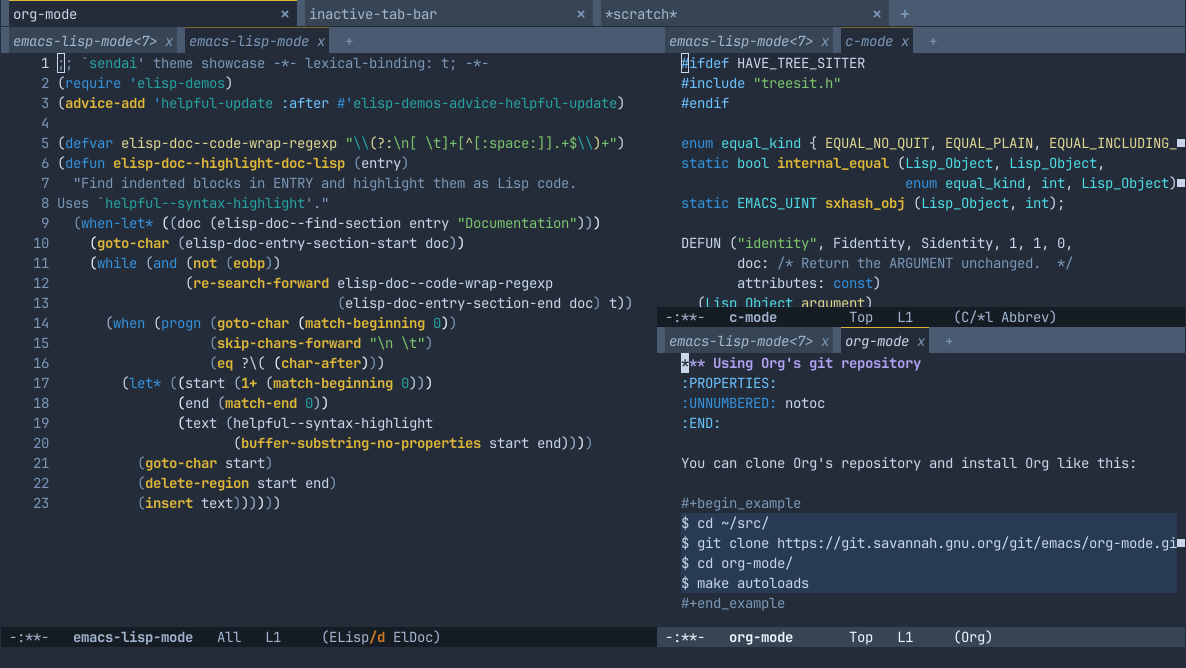
A cool blue color theme.1 sendai-theme - A cool blue theme for Emacs
════════════════════════════════════════════Sendai is a cool blue theme for Emacs, aiming for medium levels of
contrast to maintain readability without straining your eyes with
garish colors.< file:etc/screenshot.png >
1.1 Configuration
─────────────────Sendai endeavors to provide correct colors on both GUI and TTY frames
via separate color definitions for basic TTYs, 256-color TTYs, and
true-color (24-bit) displays. On 256-color TTYs, you can optionally
use the 8 basic TTY color definitions (and their bright variants)
where appropriate by enablingsendai-inherit-tty-colors. This is
useful if you set your terminal emulator's theme to match Sendai's
palette.If you use
emacsclient, you may also want to setsendai-default-classto one of the color classes to prefer that
class in cases where fulldeffacespecifications aren't supported
(e.g. withvc-annotate-color-map).
1.2 License
───────────This code is licensed under the terms of the GNU General Public
License, version 3 or later.
1.3 Contributing
────────────────This project [assigns copyright] to the Free Software Foundation, so
if you'd like to contribute code, please make sure you've filled out
the assignment form and that it's up to date. In any case, before
submitting patches, it's probably best to send a message to [the
mailing list] first so that we can discuss the best way to do things.
[assigns copyright]
< https://www.gnu.org/prep/maintain/html_node/Copyright-Papers.html >[the mailing list] < https://lists.sr.ht/~jimporter/sendai-theme-devel >
- News
1 Sendai News
═════════════1.1 v0.1.0 (2026-07-01)
───────────────────────Initial release
More Previews
1 #ifdef HAVE_TREE_SITTER 2 #include "treesit.h" 3 #endif 4 5 enum equal_kind { EQUAL_NO_QUIT, EQUAL_PLAIN, EQUAL_INCLUDING_PROPERTIES }; 6 static bool internal_equal (Lisp_Object, Lisp_Object, 7 enum equal_kind, int, Lisp_Object); 8 static EMACS_UINT sxhash_obj (Lisp_Object, int); 9 10 DEFUN ("identity", Fidentity, Sidentity, 1, 1, 0, 11 doc: /* Return the ARGUMENT unchanged. */ 12 attributes: const) 13 (Lisp_Object argument) 14 { 15 return argument; 16 } -:**- c-mode All L17 (C/*l Abbrev) 1 ;; This buffer is for text that is not saved, and for Lisp evaluation. 2 -:**- emacs-lisp-mode<3> All L3 (Elisp/d ElDoc)
1 *** Using Org's git repository 2 :PROPERTIES: 3 :UNNUMBERED: notoc 4 :END: 5 6 You can clone Org's repository and install Org like this: 7 8 #+begin_example 9 $ cd ~/src/ 10 $ git clone https://git.savannah.gnu.org/git/emacs/org-mode.git 11 $ cd org-mode/ 12 $ make autoloads 13 #+end_example 14 15 Note that in this case, =make autoloads= is mandatory: it defines 16 Org's version in =org-version.el= and Org's autoloads in 17 =org-loaddefs.el=. 18 19 Make sure you set the load path correctly in your Emacs init file: 20 21 #+begin_src emacs-lisp 22 (add-to-list 'load-path "~/src/org-mode/lisp") 23 #+end_src -:**- org-mode All L24 (Org) 1 ;; This buffer is for text that is not saved, and for Lisp evaluation. 2 -:**- emacs-lisp-mode<4> All L3 (Elisp/d ElDoc)
1 ;; `sendai' theme showcase -*- lexical-binding: t; -*- 2 (require 'elisp-demos) 3 (advice-add 'helpful-update :after #'elisp-demos-advice-helpful-update) 4 5 (defvar elisp-doc--code-wrap-regexp "\\(?:\n[ \t]+[^[:space:]].+$\\)+") 6 (defun elisp-doc--highlight-doc-lisp (entry) 7 "Find indented blocks in ENTRY and highlight them as Lisp code. 8 Uses `helpful--syntax-highlight'." 9 (when-let* ((doc (elisp-doc--find-section entry "Documentation"))) 10 (goto-char (elisp-doc-entry-section-start doc)) 11 (while (and (not (eobp)) 12 (re-search-forward elisp-doc--code-wrap-regexp 13 (elisp-doc-entry-section-end doc) t)) 14 (when (progn (goto-char (match-beginning 0)) 15 (skip-chars-forward "\n \t") 16 (eq ?\( (char-after))) 17 (let* ((start (1+ (match-beginning 0))) 18 (end (match-end 0)) 19 (text (helpful--syntax-highlight 20 (buffer-substring-no-properties start end)))) 21 (goto-char start) 22 (delete-region start end) 23 (insert text)))))) -:**- emacs-lisp-mode All L24 (Elisp/d ElDoc) 1 ;; This buffer is for text that is not saved, and for Lisp evaluation. 2 -:**- emacs-lisp-mode<2> All L3 (Elisp/d ElDoc)
1 import 'https://cdn.jsdelivr.net/npm/minisearch@7.2.0/dist/umd/index.min.js'; 2 3 (() => { 4 const tableElement = document.querySelector('.table') || window.dataTable; 5 if (!tableElement) { 6 return; 7 } 8 const where = document.querySelector('button') || tableElement; 9 10 /** 11 * @type {{symbol: string, file: string}[]} 12 */ 13 const rows = [...tableElement.querySelectorAll('tr')]; 14 const data = rows.map((tr, i) => ({ 15 id: i, 16 symbol: tr.childNodes[0].textContent, 17 file: tr.childNodes[1].textContent, 18 })); 19 const container = document.createElement('div'); 20 container.classList.add('table', 'show'); 21 container.innerHTML = ` 22 <table><thead><tr> 23 <th>Symbol<br><input id="symbol"></th> 24 <th>File<br><input id="file"></th> 25 </tr></thead><tbody id="results"></tbody></table> 26 <div class="paging"><button id="prev">Prev</button> 27 <span id="page">1-${paging.page} of ${paging.page}</span> 28 <button id="next">Next</button></div> 29 `; 30 where.parentNode.replaceChild(container, where); 31 const style = document.createElement('style'); 32 // ... 33 })(); -:**- js-mode All L34 (JavaScript) 1 ;; This buffer is for text that is not saved, and for Lisp evaluation. 2 -:**- emacs-lisp-mode<6> All L3 (Elisp/d ElDoc)
1 <!DOCTYPE html> 2 <html> 3 <head> 4 <meta charset="UTF-8"> 5 <meta http-equiv="refresh" content="0; url=https://doc.emacsen.de/elisp/nil-and-t.html"> 6 <link rel="icon" href="/favicon.ico" sizes="48x48"> 7 <link rel="icon" href="/icon.svg" type="image/svg+xml"> 8 <link rel="apple-touch-icon" href="/apple-touch-icon.png"> 9 <script type="text/javascript"> 10 window.location.pathname='/elisp/nil-and-t.html' 11 </script> 12 <title>Emacs Lisp Boolean Values</title> 13 </head> 14 <body> 15 Visit <a href="/elisp/nil-and-t.html">nil and t (GNU Emacs Lisp Reference Manual)</a> 16 for <code>nil</code> and <code>t</code> documentation. 17 </body> 18 </html> -:**- html-mode All L19 (HTML) 1 ;; This buffer is for text that is not saved, and for Lisp evaluation. 2 -:**- emacs-lisp-mode<5> All L3 (Elisp/d ElDoc)
1 :root { 2 --background:#f8f8ff; 3 --text-muted:#70777f; 4 --links:#0076d1; 5 --border:#dbdbdb; 6 } 7 @media (prefers-color-scheme:dark) { 8 :root { 9 --background:#161f27; 10 --text-muted:#a9b1ba; 11 --links:#41adff; 12 --border:#526980; 13 } 14 } 15 html { 16 margin: 0 1em; 17 } 18 body { 19 line-height: 1.4; 20 max-width: 800px; 21 margin: 20px auto; 22 word-wrap: break-word; 23 text-rendering: optimizeLegibility; 24 } -:**- css-mode All L25 (CSS) 1 ;; This buffer is for text that is not saved, and for Lisp evaluation. 2 -:**- emacs-lisp-mode<7> All L3 (Elisp/d ElDoc)