Theme Preview: unspecified
Package
| Package | unspecified-theme - melpa |
|---|---|
| Source Repository | https://codeberg.org/mekeor/unspecified-theme |
| Keywords | faces theme |
| Summary | Theme that unspecifies all attributes of all faces. |
| Version | 20251203.2130 |
| Website | https://codeberg.org/mekeor/unspecified-theme |
| Commit | f403d8f304d319729466fe019a74402d526ab0ee |
| Author | Mekeor Melire <mekeor@posteo.de> |
Theme that unspecifies all attributes of all faces.Only the
defaultface is not themed at all.
unspecified-themeis a package providing an equally named theme
which sets the attributes of all faces tounspecified-- except
for thedefaultface. In particular, it thus makes the default
attributes of (almost) all defined faces ineffective. This is
useful at least in following scenarios:
As an Emacs user, when you load this theme and customize only the
defaultface, all faces will adhere to its specification. Used
as such,unspecified-themeprovides a radically minimalist
theme.As an Emacs theme developer, you use
unspecified-themeto debug
the composability of your theme: You can loadunspecified-theme
before loading your own theme in order to check if yours depends
on default face attributes. You might even require users of your
theme to loadunspecified-themebefore loading yours in order
to erase the default face attributes.;; Usage:
unspecified-themecan be used just like any other theme. After
installation, i.e. ensuring it is in a directory that is member of
yourload-path, evaluate the following:(load-theme 'unspecified 'no-confirm)
In addition, as mentioned before, you may want to customize the
defaultface in yourusertheme. For example, if you want
everything to be white on black, then also evaluate the following:(custom-set-faces
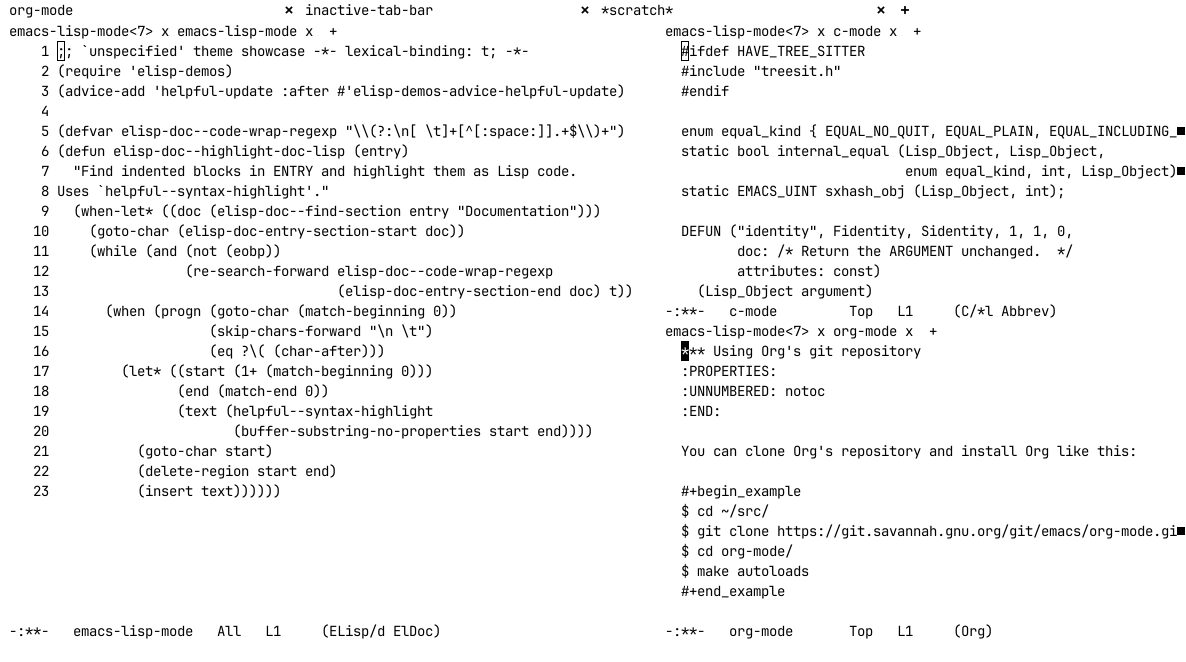
'(default ((t :background "#000000" :foreground "#ffffff")) t));; Screenshot:
A screenshot is available in the
screenshotbranch and thus
accessible on the web:
https://codeberg.org/mekeor/unspecified-theme/raw/branch/screenshot/screenshot.png;; Details:
Beside setting face attributes to
unspecified,unspecified-themealso sets some face-related variables. Take a
look at the code for the details.
unspecified-themedoes not theme thedefaultface because that
can lead to unexpected behavior in its author's experience.;; Dependencies:
unspecified-themedepends on themost-facespackage:
https://codeberg.org/mekeor/most-faces;; Roadmap:
Split this theme into two or three: (1.) A theme that unspecifies
all faces-as-faces; (2.) A theme that unspecifies all
faces-as-variables; (3.) A theme that unspecifies more complex
variables referring to faces, likehighlight-parentheses-colors
andibuffer-fontification-alist.
More Previews
1 #ifdef HAVE_TREE_SITTER 2 #include "treesit.h" 3 #endif 4 5 enum equal_kind { EQUAL_NO_QUIT, EQUAL_PLAIN, EQUAL_INCLUDING_PROPERTIES }; 6 static bool internal_equal (Lisp_Object, Lisp_Object, 7 enum equal_kind, int, Lisp_Object); 8 static EMACS_UINT sxhash_obj (Lisp_Object, int); 9 10 DEFUN ("identity", Fidentity, Sidentity, 1, 1, 0, 11 doc: /* Return the ARGUMENT unchanged. */ 12 attributes: const) 13 (Lisp_Object argument) 14 { 15 return argument; 16 } -:**- c-mode All L17 (C/*l Abbrev) 1 ;; This buffer is for text that is not saved, and for Lisp evaluation. 2 -:**- emacs-lisp-mode<3> All L3 (ELisp/d ElDoc)
1 *** Using Org's git repository 2 :PROPERTIES: 3 :UNNUMBERED: notoc 4 :END: 5 6 You can clone Org's repository and install Org like this: 7 8 #+begin_example 9 $ cd ~/src/ 10 $ git clone https://git.savannah.gnu.org/git/emacs/org-mode.git 11 $ cd org-mode/ 12 $ make autoloads 13 #+end_example 14 15 Note that in this case, =make autoloads= is mandatory: it defines 16 Org's version in =org-version.el= and Org's autoloads in 17 =org-loaddefs.el=. 18 19 Make sure you set the load path correctly in your Emacs init file: 20 21 #+begin_src emacs-lisp 22 (add-to-list 'load-path "~/src/org-mode/lisp") 23 #+end_src -:**- org-mode All L24 (Org) 1 ;; This buffer is for text that is not saved, and for Lisp evaluation. 2 -:**- emacs-lisp-mode<4> All L3 (ELisp/d ElDoc)
1 ;; `unspecified' theme showcase -*- lexical-binding: t; -*- 2 (require 'elisp-demos) 3 (advice-add 'helpful-update :after #'elisp-demos-advice-helpful-update) 4 5 (defvar elisp-doc--code-wrap-regexp "\\(?:\n[ \t]+[^[:space:]].+$\\)+") 6 (defun elisp-doc--highlight-doc-lisp (entry) 7 "Find indented blocks in ENTRY and highlight them as Lisp code. 8 Uses `helpful--syntax-highlight'." 9 (when-let* ((doc (elisp-doc--find-section entry "Documentation"))) 10 (goto-char (elisp-doc-entry-section-start doc)) 11 (while (and (not (eobp)) 12 (re-search-forward elisp-doc--code-wrap-regexp 13 (elisp-doc-entry-section-end doc) t)) 14 (when (progn (goto-char (match-beginning 0)) 15 (skip-chars-forward "\n \t") 16 (eq ?\( (char-after))) 17 (let* ((start (1+ (match-beginning 0))) 18 (end (match-end 0)) 19 (text (helpful--syntax-highlight 20 (buffer-substring-no-properties start end)))) 21 (goto-char start) 22 (delete-region start end) 23 (insert text)))))) -:**- emacs-lisp-mode All L24 (ELisp/d ElDoc) 1 ;; This buffer is for text that is not saved, and for Lisp evaluation. 2 -:**- emacs-lisp-mode<2> All L3 (ELisp/d ElDoc)
1 import 'https://cdn.jsdelivr.net/npm/minisearch@7.2.0/dist/umd/index.min.js'; 2 3 (() => { 4 const tableElement = document.querySelector('.table') || window.dataTable; 5 if (!tableElement) { 6 return; 7 } 8 const where = document.querySelector('button') || tableElement; 9 10 /** 11 * @type {{symbol: string, file: string}[]} 12 */ 13 const rows = [...tableElement.querySelectorAll('tr')]; 14 const data = rows.map((tr, i) => ({ 15 id: i, 16 symbol: tr.childNodes[0].textContent, 17 file: tr.childNodes[1].textContent, 18 })); 19 const container = document.createElement('div'); 20 container.classList.add('table', 'show'); 21 container.innerHTML = ` 22 <table><thead><tr> 23 <th>Symbol<br><input id="symbol"></th> 24 <th>File<br><input id="file"></th> 25 </tr></thead><tbody id="results"></tbody></table> 26 <div class="paging"><button id="prev">Prev</button> 27 <span id="page">1-${paging.page} of ${paging.page}</span> 28 <button id="next">Next</button></div> 29 `; 30 where.parentNode.replaceChild(container, where); 31 const style = document.createElement('style'); 32 // ... 33 })(); -:**- js-mode All L34 (JavaScript) 1 ;; This buffer is for text that is not saved, and for Lisp evaluation. 2 -:**- emacs-lisp-mode<6> All L3 (ELisp/d ElDoc)
1 <!DOCTYPE html> 2 <html> 3 <head> 4 <meta charset="UTF-8"> 5 <meta http-equiv="refresh" content="0; url=https://doc.emacsen.de/elisp/nil-and-t.html"> 6 <link rel="icon" href="/favicon.ico" sizes="48x48"> 7 <link rel="icon" href="/icon.svg" type="image/svg+xml"> 8 <link rel="apple-touch-icon" href="/apple-touch-icon.png"> 9 <script type="text/javascript"> 10 window.location.pathname='/elisp/nil-and-t.html' 11 </script> 12 <title>Emacs Lisp Boolean Values</title> 13 </head> 14 <body> 15 Visit <a href="/elisp/nil-and-t.html">nil and t (GNU Emacs Lisp Reference Manual)</a> 16 for <code>nil</code> and <code>t</code> documentation. 17 </body> 18 </html> -:**- html-mode All L19 (HTML) 1 ;; This buffer is for text that is not saved, and for Lisp evaluation. 2 -:**- emacs-lisp-mode<5> All L3 (ELisp/d ElDoc)
1 :root { 2 --background:#f8f8ff; 3 --text-muted:#70777f; 4 --links:#0076d1; 5 --border:#dbdbdb; 6 } 7 @media (prefers-color-scheme:dark) { 8 :root { 9 --background:#161f27; 10 --text-muted:#a9b1ba; 11 --links:#41adff; 12 --border:#526980; 13 } 14 } 15 html { 16 margin: 0 1em; 17 } 18 body { 19 line-height: 1.4; 20 max-width: 800px; 21 margin: 20px auto; 22 word-wrap: break-word; 23 text-rendering: optimizeLegibility; 24 } -:**- css-mode All L25 (CSS) 1 ;; This buffer is for text that is not saved, and for Lisp evaluation. 2 -:**- emacs-lisp-mode<7> All L3 (ELisp/d ElDoc)